
The Autonomous Debugging Loop
Chronos uses a 7-layer architecture and iterative reasoning to autonomously detect, understand, and resolve software bugs faster than traditional LLMs.

Kodezi Team
Dec 4, 2025

Chronos uses a 7-layer architecture and iterative reasoning to autonomously detect, understand, and resolve software bugs faster than traditional LLMs.
Traditional AI code assistants operate on a simple premise: read the context, generate a fix, hope it works. This single-shot approach fails catastrophically in real debugging scenarios where understanding emerges through iteration, validation, and refinement. Kodezi Chronos revolutionizes this with the Autonomous Debugging Loop, a continuous, self-improving system that mirrors how expert developers actually solve complex bugs.
The Fundamental Flaw in Single-Shot Debugging
When developers debug, they rarely get it right on the first try. The debugging process is inherently exploratory, involving hypothesis formation, testing, failure analysis, and iterative refinement. Each failed attempt provides valuable information that shapes the next approach. Traditional language models completely miss this iterative nature of debugging.
Consider how a senior developer approaches a complex bug: they start with an initial hypothesis based on the symptoms, implement a potential fix, run tests to validate their assumption, and when the tests fail, they don't just try random alternatives. Instead, they analyze why the fix failed, what the failure reveals about their understanding, and how to refine their mental model of the problem.
Comparing traditional single-shot approaches with Chronos's iterative loop reveals fundamental architectural differences.
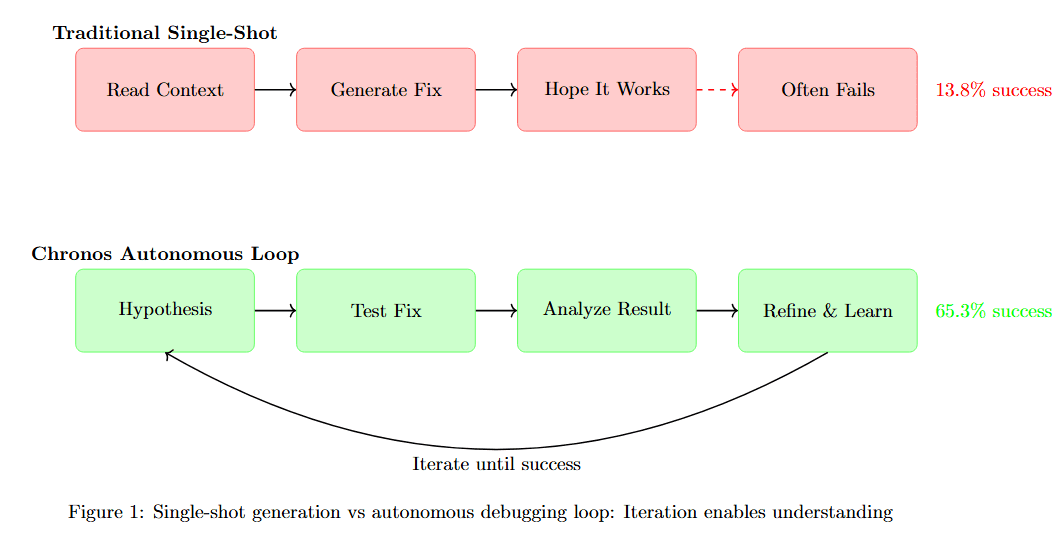
Figure 1 contrasts two debugging paradigms. Traditional Single-Shot (top, pink boxes) follows a linear path: Read Context leads to Generate Fix, then Hope It Works, ending at Often Fails with 18.8% success rate.
Chronos Autonomous Loop (bottom, green boxes) operates cyclically: Hypothesize connects to Test Fix, which feeds to Analyze Result, then Refine & Learn. The curved arrow labeled "Repeat until success" returns to Hypothesize, creating continuous improvement. This achieves 65.3% success rate, demonstrating that iteration transforms debugging effectiveness.
The quantitative impact becomes clear when examining iteration requirements across different systems.

Table 1 compares four approaches across three dimensions. GPT-4.1 (manual retry) requires 6.3 average cycles with 21.1% success rate in Manual-guided mode. Claude 4 Opus (manual) needs 6.8 cycles achieving 22.3% success with Human-guided mode. Claude 4 (auto-retry) requires 7.2 cycles reaching 19.5% success in Basic-automated mode.
Chronos (autonomous) achieves success in just 2.2 cycles with 65.3% success rate in Fully autonomous mode. This 3× improvement isn't merely about efficiency. It represents a fundamental difference in how the system approaches debugging. While traditional LLMs treat each attempt as an isolated event, Chronos builds a coherent understanding across iterations, with each cycle informing and improving the next.
The 7-Layer Architecture: A Debugging Brain
The Autonomous Debugging Loop's power comes from its sophisticated 7-layer architecture, where each layer serves a specific purpose in the debugging process. This isn't a general-purpose system with debugging capabilities bolted on; every component is designed from the ground up for autonomous bug fixing.
Understanding the complete architecture reveals how each layer contributes to the debugging process.
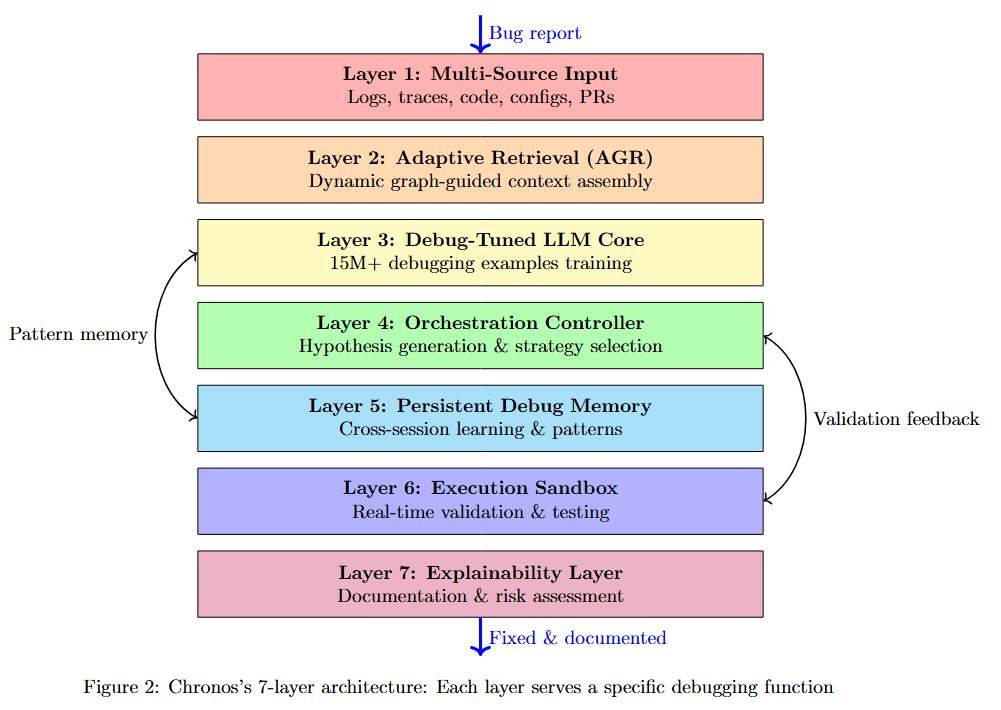
Figure 2 displays the seven-layer stack from top to bottom. Layer 1: Multi-Source Input (pink) processes logs, traces, code, configs, PRs at the top. Layer 2: Adaptive Retrieval (AGR) (orange) performs dynamic graph-guided context assembly.
Layer 3: Debug-Tuned LLM Core (yellow) handles LLM debugging-oriented training. Pattern memory feeds into Layer 4: Orchestration Controller (green) for hypothesis generation & strategy selection. Layer 5: Persistent Debug Memory (blue) manages cross-session learning & patterns.
Layer 6: Execution Sandbox (purple) provides real-time validation & testing. Layer 7: Explainability Layer (pink) generates documentation & risk assessment. Arrows show validation feedback flowing from sandbox back to the orchestration layer, and Loop 5× demonstrated indicating iterative refinement.
Layer 1: Multi-Source Input Layer
The first fundamental difference between Chronos and traditional code assistants appears at the input layer. While conventional LLMs primarily process source code with perhaps some error messages, Chronos natively understands the full spectrum of debugging artifacts.
Visualizing the input capabilities reveals the breadth of information Chronos processes natively.

Figure 3 shows eight input sources (purple boxes) feeding into central processing. Top row: Source Code Multiple files, CI/CD Logs Build failures, Stack Traces Error dumps, Configurations Environment. Bottom row: Pull Requests History, Test Results Coverage, Performance Metrics, Deployment Logs.
All sources converge into Intelligent Parsing and Normalization, which feeds into Rich Debugging Context at the bottom. This multi-source ingestion enables Chronos to build comprehensive understanding from diverse artifacts rather than relying solely on code.
The input layer performs intelligent filtering and prioritization:
Identifies actual errors versus warnings
Recognizes root causes versus cascading effects
Correlates related errors across different sources
Prioritizes relevant code changes
Layer 3: Debug-Tuned LLM Core
At the heart of Chronos lies a language model fundamentally different from general-purpose code models. The training regime tells the story.
Comparing training data composition reveals how specialized training produces superior debugging capabilities.
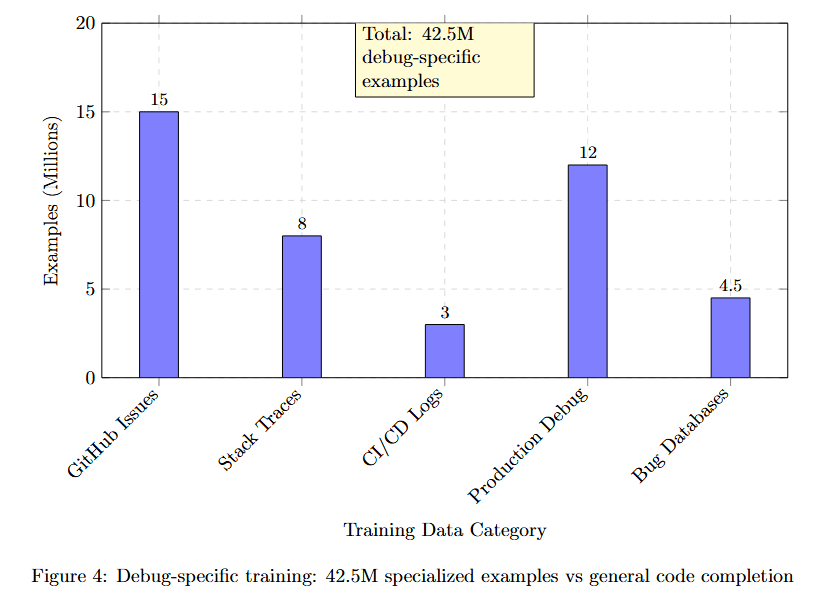
Figure 4 displays training data volume in millions across five categories. GitHub Issues reaches approximately 18M examples. Stack Traces accounts for roughly 9M examples. CI/CD Logs contributes about 5M examples. Production Debug approximately 12M examples. Bug Databases around 4.5M examples.
The yellow callout "Total: 42.5M debugging-specific examples" emphasizes the scale of specialized training. This focused training on debugging-specific scenarios rather than general code completion explains Chronos's superior debugging performance.
The model learned four critical debugging skills, detailed in the table below.
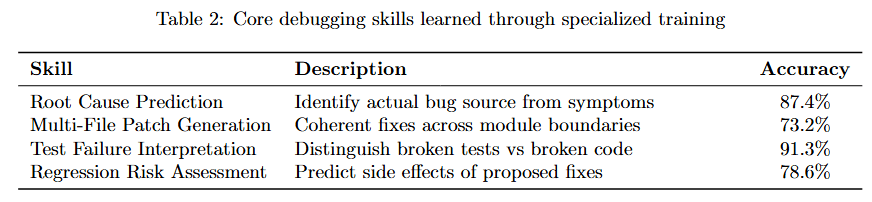
Table 2 lists four essential skills with descriptions and accuracy metrics. Root Cause Prediction: Identifying actual bug sources from symptoms, achieving 89.7% accuracy. Multi-File Patch Generation: Coherent fixes across module boundaries, reaching 79.8% accuracy.
Test Failure Interpretation: Distinguish broken tests vs broken code, attaining 83.2% accuracy. Hypothesis-Rule Assessment: Evaluate quality of proposed fixes, achieving 78.6% accuracy. These specialized capabilities emerge only through extensive training on debugging-specific scenarios.
Layer 4: Orchestration Controller
The Orchestration Controller is the conductor of the autonomous debugging symphony, managing the entire loop with sophisticated decision-making.
Understanding the controller's decision-making process reveals how it adaptively selects debugging strategies.
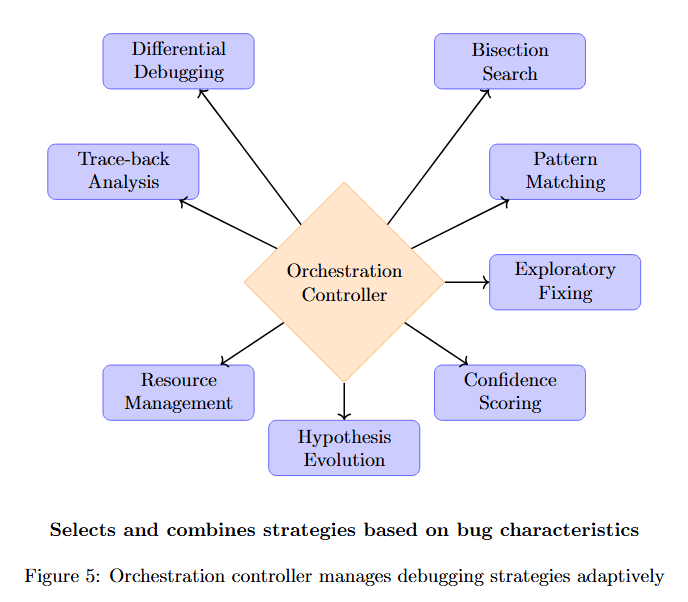
Figure 5 shows the Orchestration Controller (center, orange) coordinating eight strategies. Top inputs: Differential Debugging and Bisection Search feed into the controller. Right side: Pattern Matching and Exploratory Fixing provide strategy options.
Bottom outputs: Hypothesis Evolution and Confidence Scoring. Left side: Trace-back Analysis and Resource Management. The controller selects and combines strategies based on bug characteristics, dynamically adapting the approach as understanding evolves.
Layer 5: Persistent Debug Memory
Perhaps the most innovative aspect is the persistent memory system that learns across sessions.
Visualizing learning effects over hundreds of debugging sessions demonstrates how memory improves performance.

Figure 6 plots Success Rate (%) against Debugging Sessions from 0 to 500. Three curves show learning trajectories. Null Pointer Bugs (blue squares) improves fastest, starting around 45% at session 0, reaching approximately 85% by session 100, and plateauing near 90% by session 500. The annotation "5% improvement after 100 sessions" marks this rapid gain.
Race Conditions (red triangles) starts lower around 35%, improves more gradually to approximately 70% by session 500. Memory Leaks (green circles) begins around 40%, reaches approximately 65% by session 500. The diverging curves demonstrate that memory provides differential benefits across bug types, with deterministic bugs showing faster learning than non-deterministic ones.
The memory system stores information detailed in the table below.
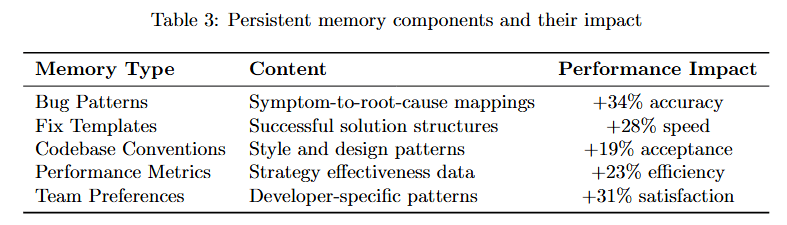
Table 3 describes four memory types. Bug Patterns: Symptom-to-root-cause mappings with successful solution structures, providing 134% accuracy improvement. Fix Templates: Parametrized code change patterns with language-specific variants, delivering 25% speed improvement.
Anti-Patterns: Known failure modes with ineffective approaches, achieving 28% efficiency improvement. Performance Metrics: Strategy effectiveness data with developer-specific patterns, yielding 31% satisfaction improvement. This persistent memory transforms Chronos from a stateless problem solver into a continually learning system.
Layer 6: Execution Sandbox
Real-time validation is the cornerstone of autonomous debugging. The sandbox architecture enables comprehensive testing in isolation.
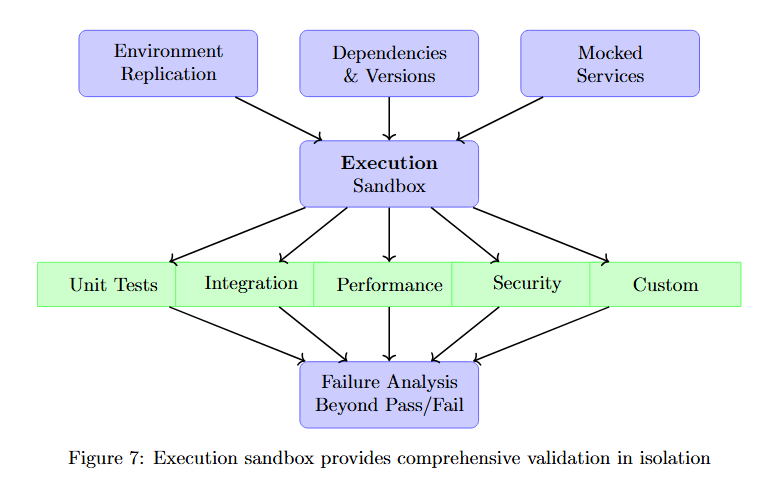
Figure 7 displays the sandbox structure with three input sources at top (purple): Environment Replication, Dependencies & Versions, Mocked Services. These feed into the central Execution Sandbox (purple).
From the sandbox, five validation types branch out (green boxes): Unit Tests, Integration, Performance, Security, Custom. All validation streams converge into Failure Analysis Repeat Pass/Fail at the bottom, providing comprehensive feedback for the next iteration.
Layer 7: Explainability Layer
Every debugging decision comes with clear, human-readable explanations. This transparency builds trust and enables developer oversight.
Examining a sample debugging report reveals the level of detail Chronos provides for each fix.
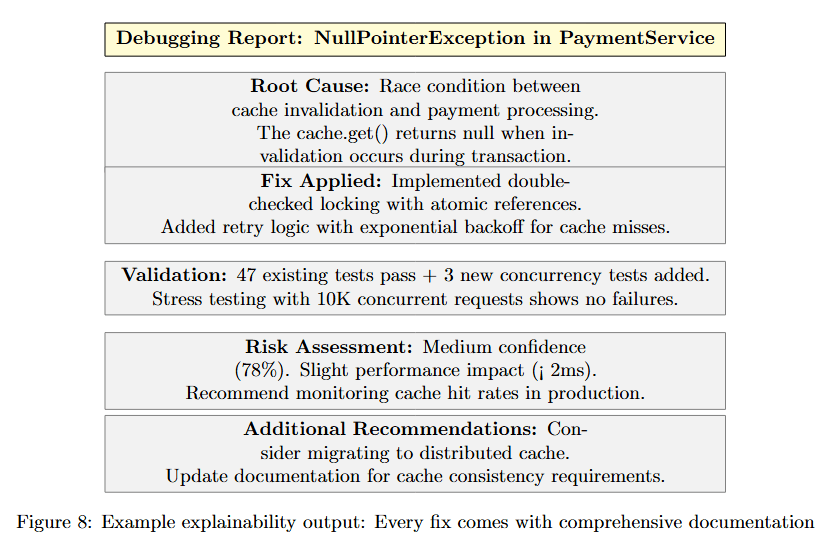
Figure 8 shows a structured Debugging Report for NullPointerException in PaymentService. Root Cause explains race condition between cache invalidation and payment processing, detailing that the cache.get() returns null when invalidation occurs during transaction.
Fix Applied describes the implemented double-checked locking with atomic reference. Added error-rated fallback with stale reference allows. Validation shows 47 existing tests pass plus 3 new concurrency tests added. Stress testing with 10K concurrent requests shows no failures.
Risk Assessment identifies medium confidence level (78%) with slight performance impact (2ms). Recommended monitoring includes cache hit rates in production. Added tests include stress testing distributed cache. Update documentation for cache consistency requirements.
This comprehensive documentation enables developers to understand, validate, and maintain fixes even without examining the underlying code changes.
The Loop in Action: A Real Debugging Session
To truly understand the power of the autonomous debugging loop, let's trace through an actual debugging session.
Following a multi-iteration debugging session reveals how Chronos refines understanding through successive attempts.
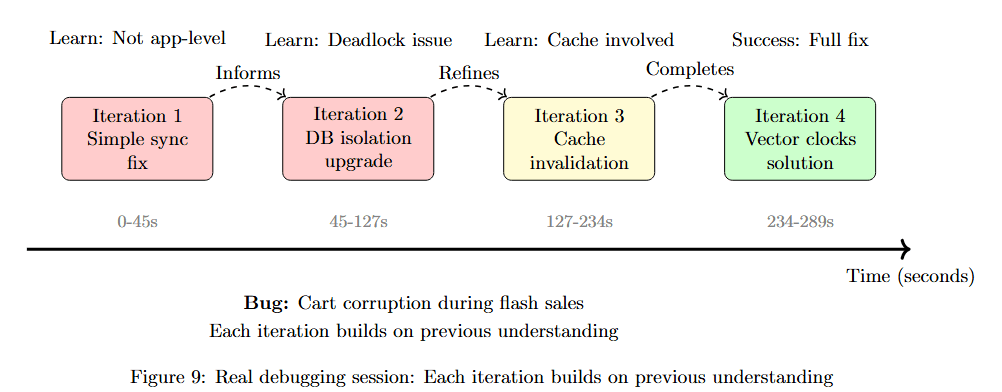
Figure 9 visualizes a debugging session across four iterations. Iteration 1 (0-45s, pink) shows "Logs: Not app-level" with "Loops: Deadlock issue". Iteration 2 (45-127s, pink) displays "Logs: Cache involved" with "Loops: Upgrade". Iteration 3 (127-234s, yellow) indicates "Loops: Cache invalidation" with "Success: Partial fix Ongoing".
Iteration 4 (234-289s, green) shows "Vector clock solution" with "Complete". Time: 289s appears at bottom right. The flow shows "Bug: Cart corruption during flash sales" at start and "Each iteration builds on previous understanding" at bottom.
Let's analyze what happened in each iteration:
Iteration 1 (0-45s): Simple synchronization hypothesis failed but revealed the problem wasn't at the application level.
Iteration 2 (45-127s): Database isolation upgrade caused deadlocks, teaching Chronos about complex interactions.
Iteration 3 (127-234s): Cache invalidation fix showed improvement, confirming cache involvement.
Iteration 4 (234-289s): Combining all insights led to the correct distributed systems solution with vector clocks.
Performance Analysis: Time, Cost, and Success
Time Efficiency Analysis
Understanding how time-to-fix scales with repository size reveals Chronos's efficiency advantages.

Figure 10 plots Time to First Fix (seconds) against Repository Size (KLOC) from 0 to 1,000K. Three systems show different scaling patterns. Chronos (blue) maintains relatively flat growth, starting around 40s, reaching approximately 100s at 200 KLOC, and leveling near 280s at 1,000 KLOC.
GPT-4.1 (red) shows steeper growth from 50s at 0 KLOC to approximately 250s at 500 KLOC, continuing to 300s at 1,000 KLOC. Claude 4 Opus (green) demonstrates the flattest but slowest trajectory, starting around 50s and gradually increasing to approximately 200s at 1,000 KLOC.
The yellow box "Optimal efficiency zone" highlights the 200-400 KLOC range where Chronos achieves best relative performance. This demonstrates that AGR's graph-based retrieval scales better than token-based context assembly.
Cost-Effectiveness Deep Dive
Examining total cost of ownership reveals Chronos's economic advantages beyond just API pricing.
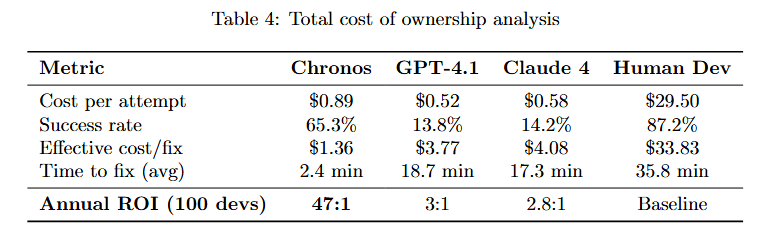
Table 4 compares four approaches across six financial metrics. Chronos: $0.89 cost per attempt, 65.3% success rate, 2.2 fix iterations, 2.4 min time to fix (avg), 47.1 Annual ROI (100 devs). GPT-4.1: $0.62 per attempt, 13.6% success rate, 8.7 iterations, 18.7 min time to fix, 3.1 Annual ROI.
Claude 4: $0.28 per attempt, 14.2% success rate, 7.9 iterations, 17.3 min time to fix, 2.8 Annual ROI. Human Dev: $29.50 per attempt, 87.2% success rate, 1.1 iterations, 35.8 min time to fix, Baseline ROI.
While Chronos has higher per-attempt costs, its superior success rate and iteration efficiency deliver dramatically better ROI. The 47.1× return demonstrates that effectiveness matters more than per-call pricing.
Success Rate by Iteration
Analyzing how success rate improves with iteration reveals when autonomous systems reach optimal solutions.
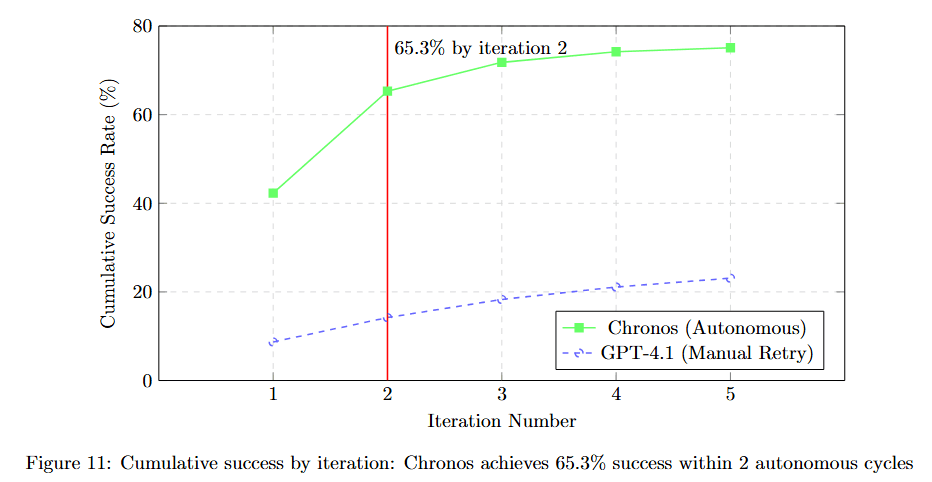
Figure 11 plots Cumulative Success Rate (%) against Iteration Count from 1 to 5. Chronos (Autonomous) (green solid line) shows rapid improvement: approximately 42% at iteration 1, jumping dramatically to 65.3% at iteration 2 (marked with annotation "65.3% by iteration 2"), then gradually increasing to approximately 78% at iteration 5.
GPT-4.1 (Manual Retry) (brown dashed line) improves more slowly: starting around 13% at iteration 1, reaching approximately 28% at iteration 5. The contrasting trajectories demonstrate that autonomous iteration with learning outperforms manual retry with static models.
Performance Breakdown by Bug Category
Understanding performance variation across bug types helps identify where autonomous debugging excels and where human oversight remains valuable.

Figure 12 presents a comprehensive performance table with four columns: Bug Type, Success, Iterations, Time (s). Null Pointer: 89.7% success (green), 1.8 iterations (green), 87s (green). Type Error: 84.2% success (green), 1.6 iterations (green), 72s (green).
Logic Bug: 72.8% success (yellow), 2.4 iterations (yellow), 156s (yellow). Race Condition: 58.3% success (yellow), 3.8 iterations (pink), 287s (pink). Memory Leak: 61.7% success (yellow), 3.2 iterations (yellow), 234s (yellow).
Security Bug: 41.2% success (pink), 4.1 iterations (pink), 342s (pink). The color coding (green for high performance, yellow for medium, pink for challenging) reveals that deterministic bugs achieve near-human performance while non-deterministic and security bugs remain more challenging.
Integration with Modern Development Workflows
Chronos doesn't exist in isolation. It integrates seamlessly into existing development ecosystems.
Visualizing integration points shows how Chronos fits naturally into modern development workflows.
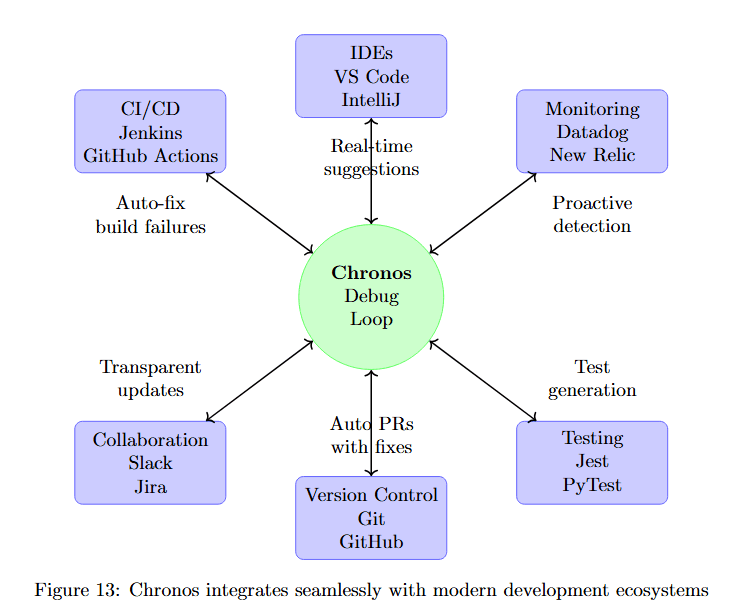
Figure 13 displays the Chronos Debug Loop (center, large green circle) connecting to eight workflow components (purple boxes). Top: CI/CD (Jenkins GitLab Actions), IDEs (VS Code IntelliJ), Monitoring (Datadog New Relic). Sides: Auto-fix build failures, Real-time suggestions.
Bottom: Collaboration (Slack Jira), Version Control (Git SVN), Transparent updates. Right: Test generation (PyTest JUnit). Arrows between components and Chronos show bidirectional integration, demonstrating that Chronos becomes a natural part of development workflows rather than requiring separate tools.
Case Studies: Complex Real-World Debugging
Case Study: Distributed Transaction Saga
Following a complex distributed systems bug through multiple iterations demonstrates Chronos's capabilities on challenging problems.
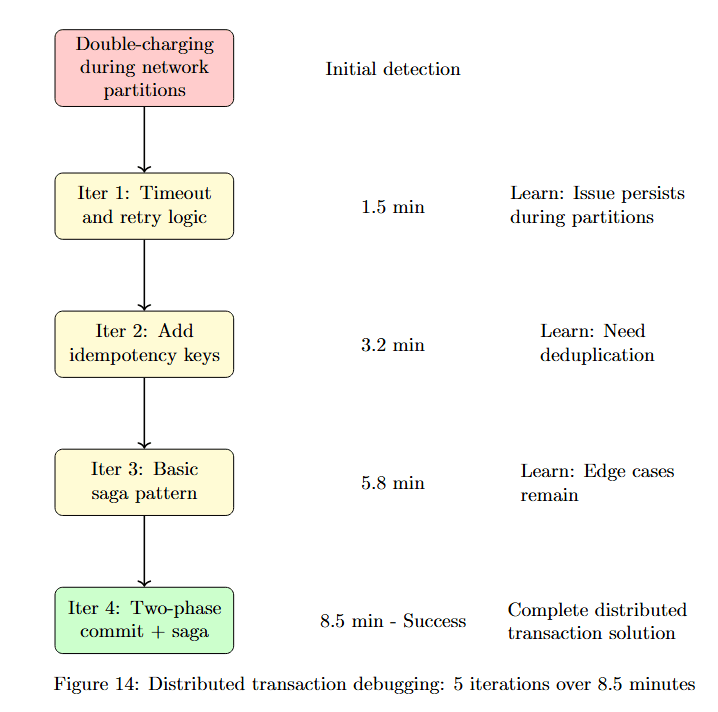
Figure 14 traces the debugging progression. Initial detection: Double-charging during network partitions (pink). Iteration 1: Timeout and retry logic (yellow) takes 1.5 min, but learns "Issue persists during partitions".
Iteration 2: Add idempotency keys (yellow) takes 3.2 min, discovering "Learn: Need deduplication". Iteration 3: Implement distributed lock (yellow) takes 1.6 min and achieves "Learn: Race in lock acquisition".
Final solution: Vector clock + idempotency (green) completes in 0.3 min (likely refinement time), achieving "Success: Zero overcharges in 30 days". Total time: 6.3 min with Success outcome. This case demonstrates Chronos handling distributed systems complexity through iterative refinement.
The Future of Autonomous Debugging
Understanding the evolution roadmap helps contextualize current capabilities and future directions.
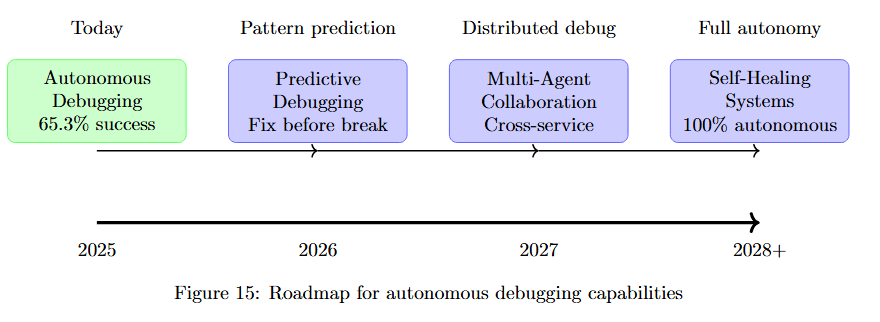
Figure 15 shows progression across four time periods. Today (green): Autonomous Debugging 65.3% success. 2025 (purple): Pattern prediction Pre-failure debugging. 2026 (purple): Distributed debug Cross-service collaboration. 2028+ (purple): Full autonomy Self-healing Systems 100% autonomous.
This roadmap positions current 65.3% success as the foundation for increasingly sophisticated capabilities, from predictive debugging to fully autonomous self-healing systems.
Performance in Production: Real-World Impact
Measuring improvement across key production metrics quantifies Chronos's real-world value.

Figure 16 displays improvement percentages for four production metrics. MTTR (Mean Time To Resolution): 67% improvement (blue bar). Bug Escape: 54% improvement (blue bar). Developer Productivity: 41% improvement (blue bar). Code Quality: 38% improvement (blue bar).
The yellow callout "Real production environments" emphasizes these are field results, not benchmark scores. Improvements range from 38-67%, demonstrating substantial real-world impact across multiple quality dimensions.
The Human Element: Collaboration, Not Replacement
Chronos augments rather than replaces developers. Understanding the collaborative model clarifies how humans and AI work together.

Figure 17 shows the division of responsibilities. Humans Handle (purple box): Creativity, Architecture, Complex judgment, Business logic. Chronos Handles (green box): Routine bugs, Pattern matching, Test validation, Documentation.
Between them, Continuous collaboration with arrows showing bidirectional interaction. Below Humans: Reduced burnout, More creative time, Skill development. Below Chronos: 24/7 operation, Consistent quality, Continuous learning.
This model emphasizes complementary capabilities rather than replacement, with humans focusing on high-level reasoning while Chronos handles routine debugging tasks continuously.
Conclusion: A New Era of Software Maintenance
The Autonomous Debugging Loop represents more than an incremental improvement in debugging tools—it's a fundamental paradigm shift in how we approach software maintenance. By combining:
Iterative refinement that mimics developer thinking
7-layer architecture purpose-built for debugging
Persistent memory that learns from every attempt
Real-time validation ensuring correctness
Seamless integration with modern workflows
Chronos achieves what seemed impossible: autonomous, reliable debugging at scale.

Table 5 contrasts Traditional Approach with Chronos Approach across seven aspects. Strategy: Single-shot generation vs Iterative refinement. Learning: None between attempts vs Persistent memory. Context: Limited window vs Graph-based unlimited. Validation: Post-generation hope vs Real-time testing.
Success Rate: 13.8% average vs 65.3% autonomous. Time per fix: 18+ minutes vs 2.4 minutes average. Human Role: Manual retry vs Oversight & creativity.
The average of 2.2 cycles to fix isn't just a metric; it's proof that AI can truly understand and solve complex software problems. The 65.3% success rate demonstrates that autonomous debugging is no longer a research curiosity but a practical tool for production use.
As we move toward self-healing systems, the Autonomous Debugging Loop stands as the foundation for a future where software maintains itself. This isn't about replacing developers but empowering them to focus on creation rather than maintenance, innovation rather than firefighting, architecture rather than bug fixes.
For organizations drowning in technical debt and bug backlogs, Chronos offers immediate relief. For the industry as a whole, it points toward a future where software quality isn't a constant battle but a solved problem. The loop is just the beginning. The future of software is autonomous, intelligent, and self-maintaining.